
Home audio automation changes the way a guest feels when they walk in and the music is already playing. It’s not because someone turned it on when the doorbell rang. It’s because the system knew the front door opened and it automatically started the music in the entry and living room areas. The music was already set to the playlist for that evening. No one pushed a button, the house did it on its own.
That moment, which the guest doesn’t even notice and which is easy for the host, is what makes a home audio system truly automated. It’s not a bunch of wireless speakers that someone sets up before a party. The speakers might be the same. The difference is in how the system’s programmed to know what to do and when and how much of that is planned before the evening starts instead of during it.
At Homeva the home audio automation starts with the hosting schedule in mind not with where the equipment’s placed or how the racks are set up. The whole-home audio service is built around how a family entertains: which rooms have music, which stay quiet, how the mood changes from when guests arrive during dinner and later, in the evening and who in the family needs to be able to adjust something without stopping what they are doing.
What a Preset Scene Actually Controls
The term audio preset gets used loosely, and the gap between a preset that saves a volume level and one that actually supports a hosting routine is worth understanding before deciding what kind of home audio automation to build.
A basic preset stores a source and a volume for a single zone. The living room plays a specific playlist at 40 percent volume. That is useful, and it is what most consumer multi-room audio systems offer. A well-designed home audio automation preset goes further: it defines the source, the volume, the zones that are active, the zones that are muted, and the relationship between them.
A dinner preset might bring the dining room to 35 percent with a curated playlist, raise the kitchen to 25 percent so the host can still hear while finishing dishes, and mute the media room and the upstairs zones entirely. One press handles all of that simultaneously, and the household does not have to manage six individual zones to arrive at a coherent sonic environment.
The presets that matter most in a hosting context are not the ones that cover the obvious moments. Every system can handle music on, living room. The value of home audio automation shows up in the transitions: from cocktail hour to dinner, from dinner to a later, quieter gathering, from the evening scene to a clean shutoff that does not require the host to remember which zones are running.
How Guests Interact Without Learning the System
One of the most revealing tests of any home audio automation installation is what happens when a guest wants to change something. Not the host. A guest who has no context, no account, and no prior experience with the system, who simply wants the music a little louder in the room where they are sitting.
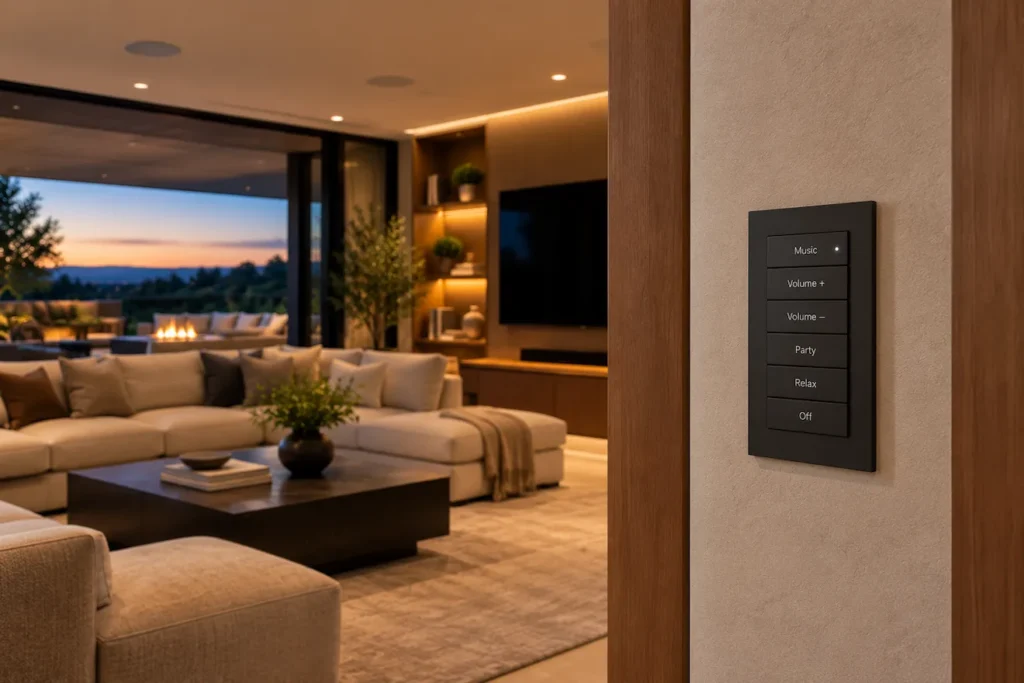
A system that requires the app is a system that requires the guest to download something, log in, and navigate an interface they have never seen. A system that has a wall-mounted keypad with a volume rocker and a few scene buttons is a system the guest can operate in under five seconds without asking anyone. The keypad does not need to expose the full depth of the system. It needs to do the three things a guest is likely to want: volume up, volume down, and possibly a scene change. Everything else stays in the host’s hands through the app or a more capable panel elsewhere in the home.
The distinction between guest-accessible controls and host-managed controls is a home audio automation design decision, not an accident of how the hardware ships. In a properly considered installation, the keypads placed in entertaining spaces are configured for exactly the subset of functions a guest might need, while the deeper system management, changing sources, adjusting which zones are active, scheduling the evening shutoff, lives in the interface the host uses. That division keeps the guest experience frictionless while keeping the host in control of the system’s overall behavior.
For homeowners upgrading an existing property, Homeva can help evaluate how guest-friendly controls fit into the home’s current layout, including keypad placement, wiring access, and integration with existing equipment.
Zone Handoffs and Why They Define the Evening
The audio experience in a home that entertains frequently is not a static state. It is a sequence of states that change as the evening progresses and as people move through the space. Home audio automation that handles those transitions gracefully is operating at the level of a hosted experience. Home audio automation that requires someone to manually adjust the system each time the context shifts is operating as an elaborate remote control.
A zone handoff is the transition from one audio state to another as the gathering moves. The clearest example of this is the outdoor-to-indoor handoff that happens after a summer gathering on a terrace. As people move from the pool and patio into the house the sound levels in those zones gradually fade. At the time the interior zones ramp up to match the volume that was already set on the terrace. The audio source continues without any break. The guest walking from the patio into the living room hears an uninterrupted experience. The host didn’t touch anything. The system carried out a preset that had been set up in advance for that transition.
Not all handoffs are so obvious. Some happen during the gathering with no physical movement at all. The shift from a louder cocktail-hour music level to a dinner tone, the slow fade that signals the evening is winding down without anyone needing to say a word. The quiet moment when the system completely shuts off a zone at a scheduled time even though the last guests are still standing at the door. These subtle transitions are what home audio automation makes possible. With systems someone would have to be actively managing every change. During the middle of hosting, active management is the last thing a host should be worrying about.
The Source Question: What Plays and Who Chooses It
A home audio automation system is only as good as the music it plays. The source architecture, how streaming services connect to the system, how authentication works and who can queue music from which device needs to be thought through before installation, not after.
Modern distributed audio systems support streaming services directly or, through an integration layer. The practical question isn’t which services are technically compatible but which ones the household actually uses and which ones guests are likely to have on their phones. It’s not enough to support Spotify or Apple Music. It’s about knowing who will be playing music and how they will do it. A system that allows guests to queue music from their own streaming account to a specific zone without taking over the entire system is a genuinely different hosting tool than one where the host controls the source entirely. Both are valid configurations. The choice should reflect how the household actually entertains rather than how the system’s defaults work out of the box.
The whole-home audio platform integrated with the broader smart home system adds a layer of source management that standalone audio systems cannot provide: the ability to tie a source change to a broader scene change, so switching from background music to a live sports event in the media room simultaneously adjusts the lighting, lowers the shades, and sets the audio level for viewing rather than conversation. That kind of coordinated response to a content change is where home audio automation stops being about speakers and starts being about the actual experience of being in the room.
Homeva approaches whole-home audio integration by considering how streaming sources, listening zones, and existing smart home systems work together. This helps homeowners plan an audio experience around their daily routines rather than managing disconnected devices.
Building Presets Around Real Hosting Patterns
The most common shortcoming in home audio automation installations is presets built around what the system can do rather than around how the household actually entertains. A system configured with twelve scenes named by room and volume level will be used for one or two of them and ignored for the rest, because the names do not map to anything the host recognizes as a moment in their own routine.
Presets built around actual hosting patterns look different. They are named for what is happening in the home rather than for what the system is doing. “Arrival” is not “Living Room 40%.” It is the state the home reaches when guests are coming through the door and the host wants the space to feel alive without being loud. “Dinner” is not “Dining Room 35%, Kitchen 25%.” It is the acoustic environment that lets conversation carry across a table without anyone raising their voice. “Late Evening” is the quieter version that signals the pace has slowed without the host having to do anything to make that signal clear.
This naming convention is the same principle that applies in every other interface layer of a well-designed home: the label describes an experience rather than a technical state, and anyone who reads it can predict what it produces without prior training. A houseguest handed a keypad with those four labels can navigate the evening’s audio without asking the host once. That is the standard home audio automation should be held to, not how many sources it can handle simultaneously.
Designing for the Morning After the Party
A hosting-focused home audio automation system earns part of its value the morning after, when the household wants the previous evening’s configuration gone without having to undo it piece by piece. A well-designed system has a single “Reset” or “Morning” preset that restores the audio environment to a quiet, default state across all zones: lower levels, a different source better suited to morning routines, and all the entertaining presets cleared from the active state.
That morning reset is a small thing that feels like a large thing when it is missing. A home with a sophisticated audio system that still requires someone to check eight rooms to confirm that nothing is still playing from the night before has not been designed for the people who live in it. Home audio automation at its most functional is invisible in both directions: during the event and after it.
The broader design principle behind that morning preset is building the system around the household’s full daily rhythm rather than just the moments of active use. A home audio automation installation that accounts for mornings, weekday afternoons, weekend evenings, and the particular character of each of those states produces a system the household interacts with every day rather than only when entertaining. That daily relationship is what makes the hosting functionality feel effortless when it is needed, because the system is already a familiar part of how the home operates.
Contact Homeva to map your hosting routines with an audio specialist and build preset scenes around how your home actually entertains.
FAQ
What does a home audio automation preset control?
A preset defines the active zones, source, and volume level for a specific moment in the home’s routine. A well-designed hosting preset may simultaneously bring certain rooms up, mute others, set a specific playlist, and establish volume relationships between adjacent spaces, all from a single button press or a scheduled trigger.
How can guests adjust the audio without learning the full system?
Wall-mounted keypads in entertaining spaces can be configured to expose only the functions a guest might need: volume up, volume down, and a scene change. The deeper system management stays in the host’s interface. That division makes the guest experience frictionless without taking control away from the household.
What is a zone handoff in a whole-home audio system?
A zone handoff is the transition from one audio state to another as people move through the home or as the character of the gathering changes. A well-designed handoff carries the source and maintains a consistent level as the active zones shift, so the experience is continuous rather than interrupted. The host triggers the handoff with a single preset rather than adjusting individual zones manually.
Can guests queue music from their own streaming accounts?
Depending on the platform and how the system is configured, yes. Some distributed audio systems allow guests to queue music to a specific zone from their own account without taking control of the full system. The appropriate configuration depends on how the household entertains and how much source control they want to extend to visitors.
How many preset scenes does a home audio system need?
Most hosting routines are served well by four to six scenes that correspond to distinct moments in the household’s day: arrival, casual background listening, dinner, an active entertaining configuration, a wind-down state, and a morning or reset preset. More scenes than that tends to produce a system where most of the presets go unused because they do not map to anything recognizable in the household’s actual routine.
What happens to the audio system after the gathering ends?
A morning or reset preset that restores a quiet, default audio state across all zones removes the need to manually check each room after an event. This single-press reset is a small operational detail that makes a significant difference in how the system feels to live with on an ongoing basis, not just on the nights when the home is full of guests.